FAQ
Answers to common questions: selling skins, payouts and Steam rules.
Answers to common questions: selling skins, payouts and Steam rules.
Instant sale and faster access to funds mean that after a successful Steam trade, money can reach your balance quickly — and you can withdraw to your card right away. In short: your balance is the entry point for money after a sale. Once the amount is credited, you can go straight to withdrawal and pick a convenient method.
No KYC verification, no limits. Withdrawals are in your account — open the “Withdraw” section and choose a method.
1. Credit. After a sale, funds are added to your balance. 2. Trade. Confirm the trade offer in Steam when the bot sends it. 3. Withdraw. Once funds are on your balance, withdraw using any method that suits you (for example, to a bank card). Questions about withdrawal methods? Open the withdrawal section in your account.
We focus on popular Steam Community Market games: CS2, Dota 2, Rust, and TF2. You can sell skins to the site or buy from other users via P2P after signing in with Steam.
On Steam you receive an in-game wallet with no card withdrawal. On MarketSkins, funds go to your site balance with convenient payout options. Buy-side prices may be below Steam market levels because you get liquidity outside the Steam client — that is reflected in the quote.
No. All actions (selling, withdrawing) must be done on your own account. You cannot use third-party trade links, move balance between accounts, or bypass the rules — that is blocked and conflicts with Steam policies.
We only use data needed for Steam sign-in, processing deals, and contacting you (nickname, avatar, SteamID, payout contact details). See the privacy policy on the site; we do not sell your data to third parties for advertising.
Sign in with Steam, save a valid trade link in settings, refresh your inventory, select items, and submit an order. After the bot sends a trade offer, confirm the trade in Steam — once accepted, the order amount is credited to your balance.
Instant sale on MarketSkins means that after a successful Steam trade, money reaches your site balance faster and you can request withdrawal to a card or another available method — without waiting the full trade-hold period where that applies to your account and deal type. Step by step: 1) Select items and sell as usual: the bot sends a trade offer, you confirm it in Steam. 2) After the trade is accepted, the order amount is credited to your MarketSkins balance. 3) Once funds show on your balance, open withdrawal, choose a method (for example, bank card), enter details, and confirm. 4) Track status and history in your account — you can see which stage a payout is in. Important: • Instant withdrawal does not override Steam rules: the trade must be confirmed in the client; escrow or trade restrictions may change the timeline. • Available methods and minimum amounts are shown when you submit a withdrawal — channels may have their own thresholds. • If withdrawal is disabled, check your balance, the minimum for the chosen method, and order status (sometimes payout is only available after full credit). • For delays, contact support with your request ID or a status screenshot — that speeds up investigation. Shorter overview: see “Instant sale and withdrawal” in the left sidebar of this help page.
Instant sale and faster withdrawal are available after you complete at least one successful deal worth at least 10,000 뿯₽.
P2P on MarketSkins is a deal directly between two users in on-site chat: you agree on terms yourselves; buyer (Buyer) and seller (Seller) roles are fixed when the deal is created, along with amount and currency. Payment: by default the buyer pays the deal amount plus a 2% platform fee on top. Funds do not go to the seller immediately: they stay with the platform until the buyer confirms receipt in Steam. After payment: the buyer posts a trade URL in chat. The seller sends a trade offer using that link and confirms in the Steam mobile app, then clicks “Trade sent”. The buyer checks the trade and clicks “Confirm receipt” only if everything matches — then the deal amount is credited to the seller's balance. Closing: both parties must click “Deal completed”; the deal chat then closes. Sellers: withdrawal from balance may not be instant — allow for protection periods up to 7 days (in line with Steam Trade Protection). Important: record all terms only in this chat; trying to move payment or agreements off-platform to avoid the 2% fee may lead to a ban. Disputed cancellations go through MarketSkins admin via chat. Start P2P from the “P2P” menu or your account. Cancelling a deal and consequences Cancellation is only through MarketSkins admin: write in chat “Request cancellation” with a short reason. Until admin decides, do not confirm trades or mark the deal complete without coordination. • If the buyer initiates cancellation — refund up to 50% of the amount paid in. • If the seller initiates cancellation — platform restriction (MarketSkins trade ban) for 30 days on P2P/trades/sales. • Cancellation without reason or “bailing” after agreed terms — sanctions apply. • Abusing Steam trade cancellations (breaking offers) may lead to a permanent platform trade ban. • Repeat violations, fraud, or rule evasion may result in a permanent ban from P2P and sales on MarketSkins. Why you cannot “just cancel the trade” in Steam Steam has tightened anti-fraud measures: mass cancellations or suspicious trade activity can restrict your account. Follow the rules, keep agreements in MarketSkins chat, and contact admin in disputes. Below — an example Steam warning about risky activity.
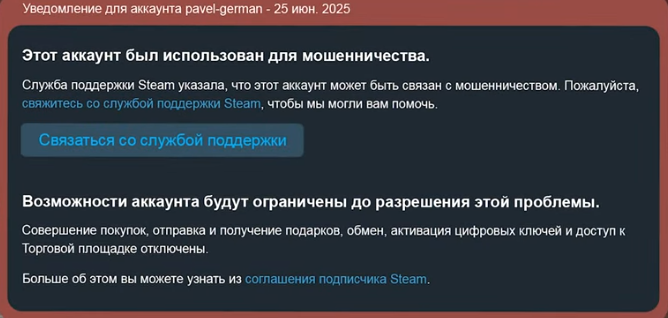
Steam may restrict an account when fraud or trade-cancellation abuse is suspected — do not break deals without coordinating with MarketSkins admin.
Minimum amounts for selling and withdrawal depend on platform settings and the payout method. Some methods have their own lower limits — shown when you choose a withdrawal option.
Statuses and amounts appear in your account under “Transactions”: draft, quote, offer sent, waiting on Steam, completed, and so on. You will also see time and order ID.
An item may be non-tradable, restricted by Steam, or we may temporarily not buy it due to demand or stock limits. Such items are marked or hidden on the sell page.
Check that you meet the minimum for the chosen method and that the order status allows payout. Some payment channels have their own minimums — a hint appears when you select a method.
No. After you confirm the trade in Steam, the item goes to the recipient; reversal is not possible under Steam rules, and a hold period often applies. Before accepting, verify the bot, items, and terms.
Pricing currently focuses on base item value; extra pay for float, stickers, or rare patterns may not apply in this MVP. If we add rarity pricing, we will announce it on the sell page and in news.
Steam Trade Protection is Valve’s trade safeguard: after you accept a trade, items may be locked on Steam’s side for up to about 7 days to reduce fraud and reversals. For MarketSkins sales this means you still confirm the trade in Steam as usual, while balance credit and withdrawal timing depend on your account status and deal rules (instant sale is not available to everyone from day one). Do not cancel an accepted trade without coordinating with support — Steam may restrict trading.
New users may face temporary limits due to trade-cancellation abuse: payouts on such accounts can be delayed up to 7 days, then processing continues per deal rules. If you cancel a sale trade under Steam Trade Protection with payout after the hold, the deal may be auto-cancelled without a full reversal. Steam may impose a 30-day trade ban. To cancel a deal and return items under rules agreed with support — contact MarketSkins support.
For fast trades without long holds, Steam recommends linking your phone and confirming trades in the mobile app. Without these security steps, Steam may restrict trading, including a 30-day trade ban.
You can withdraw to a bank card, via faster payments where available for your region, or in cryptocurrency. Supported networks and assets depend on connected providers: typically USDT (BNB Smart Chain, ERC-20, TON, TRC-20), Bitcoin, Ethereum, Litecoin, Binance Coin, Solana, USDC (BNB, ERC-20), and more. See the full list in the withdrawal window after sign-in.
Withdrawal is available in USDT (BNB Smart Chain, ERC-20, TON, TRC-20), Bitcoin, Ethereum, Litecoin, Binance Coin, Solana, USDC. The live list and networks appear when you submit a withdrawal request.
Fees depend on the payment system and are shown before you confirm the request. MarketSkins does not add hidden fees — the amount you receive is clear on the confirmation step.
Most payouts are processed within 5–15 minutes. If a payment is delayed, the cause is often the bank or payment provider. We track such cases and complete the transfer when possible.
Check status in your account. If it says “Processing”, the payment is not finished yet. If it says “Paid” but funds did not arrive — contact support: we will check manually using your details and logs.
If the request has not started processing, contact support — we may adjust details manually when needed. After the transfer starts, details usually cannot be changed.
You can invite new users with your link and earn a percentage of their sales (typically from 10%; exact terms are in the program section or from support). The link is in your account when the program is active. Custom rates can be discussed with support.
There are no random “free” bonuses — but there is a referral program, promos, and giveaways. Follow news on the site and our social channels.
Support replies daily from 9:00 to 00:00 Moscow time (GMT+3). Outside those hours, requests are queued and handled in order.
You can leave a review on the home page, in the “Reviews” section, on Trustpilot, or on our social channels. Your feedback matters — it helps us improve the service.