How it works
From Steam login to payout: Trade Protection timing, picking items, and choosing how you receive funds.
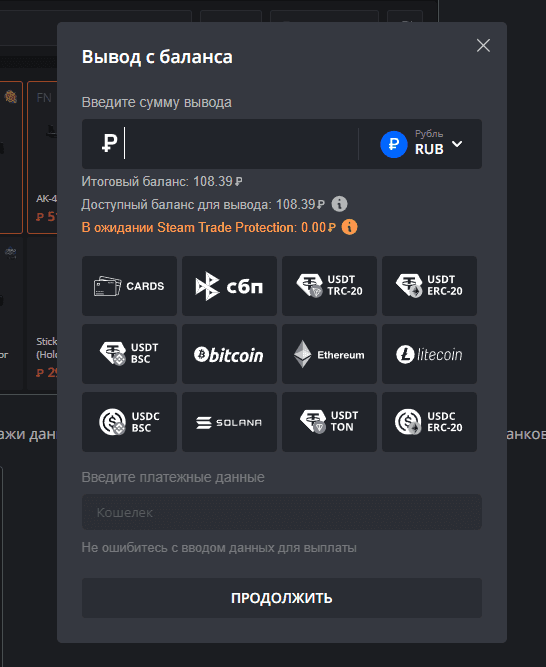
MarketSkins is a platform for selling skins from CS2, Dota 2, Rust, and other games supported on the site. You can receive payouts to a bank card, via SBP, FK Wallet, and major cryptocurrencies (USDT, Bitcoin, Ethereum, and more — as shown in the withdrawal flow).
After a Steam trade is completed, funds are subject to Steam Trade Protection for CS2: Valve may hold the transaction for up to 7 days. If the item is not reversed and the trade stands, the balance is credited to your MarketSkins account according to the service rules.
After money is on your site balance, crypto and e-wallet routes are typically the fastest in the UI; bank card transfers can take up to a few business days depending on the bank and provider.
To sell skins on MarketSkins, follow the steps below.
1. Sign in with Steam
Use the Steam button on the site. We only need standard Steam OpenID login — never share your Steam Web API key with untrusted pages.
2. Open your inventory and pick items
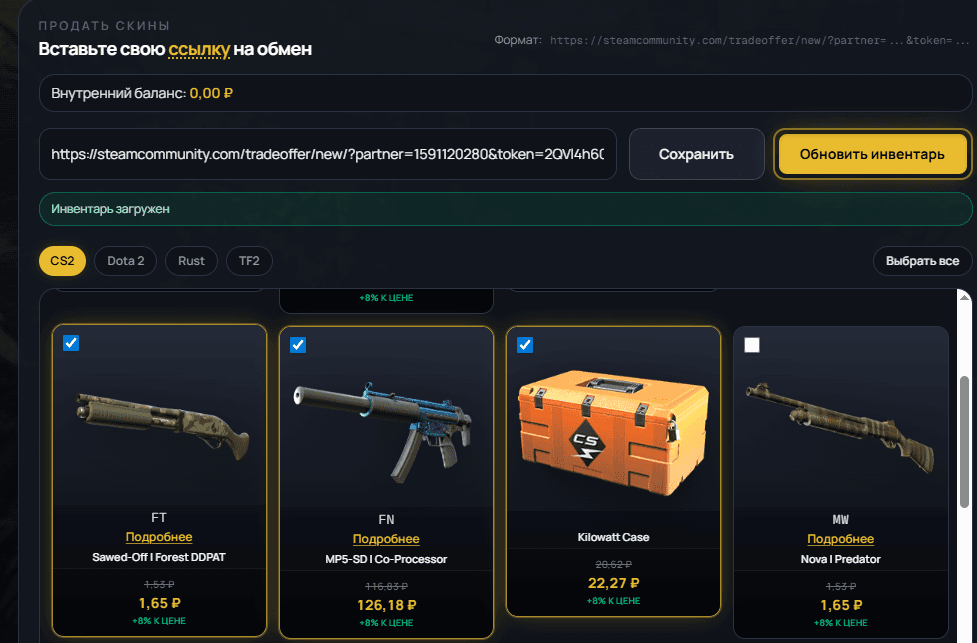
Paste your trade link, choose the game tab, then tick the skins you want to sell. The header shows your internal balance— sale proceeds are credited there after the trade. Use search, price sorting, and "select all" where the UI offers it.
3. Choose how you get paid
Money from completed sales goes to your site balance first. Open Withdraw from balance in your account, enter the amount, pick cards / SBP / crypto, and fill in wallet or card details carefully — mistakes delay payouts.
4. Double-check and confirm
Review the total, fees, and item list, then confirm the trade in the Steam client. Wait for the hold period to end where applicable, then withdraw from balance when allowed.